On this page · 8 sections
Quick answer
Don't answer unknown numbers, and hang up on robocalls without pressing any buttons. Then turn on your phone's built-in protection: on iPhone, Settings > Apps > Phone, then set Call Screening and turn on the Spam filter. On a Pixel, use Call Screen; on a Samsung, turn on Caller ID and spam protection. Add your carrier's free spam blocker, forward spam texts to 7726 and register at DoNotCall.gov.
Layer it: phone-level screening (Ask Reason for Calling or Silence on iPhone, automatic Call Screen on Pixel, Block spam and scam calls on Samsung), your carrier's free app (AT&T ActiveArmor, Verizon Call Filter, T-Mobile ScamShield), block repeat numbers, report texts to 7726, and report calls at DoNotCall.gov or ReportFraud.ftc.gov.
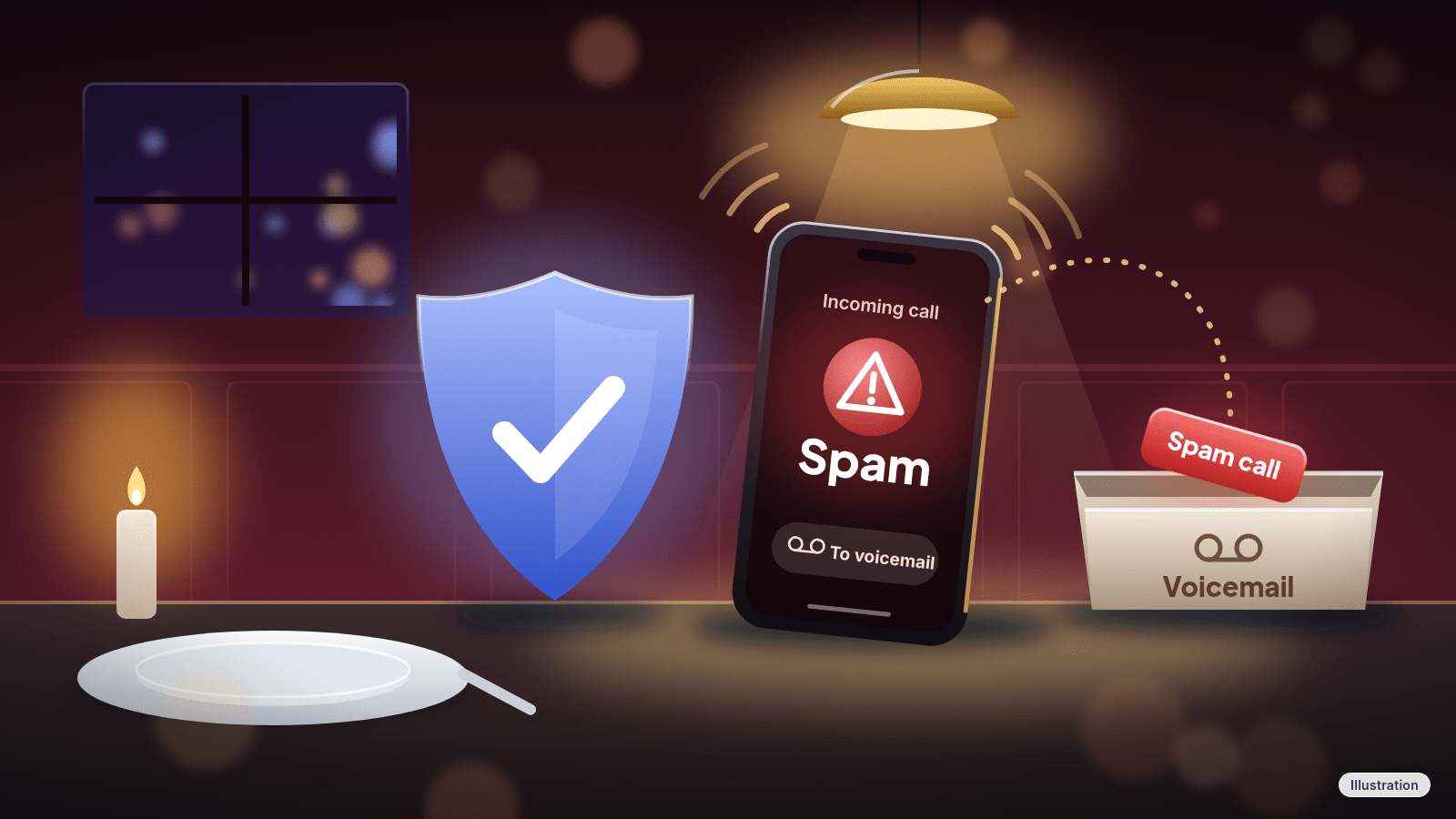
Your phone buzzes during dinner. Again. "Scam Likely," a number that looks almost like yours, or a recording about your car's warranty. You block one number and three more show up.
You can't stop scammers from dialing, but you can stop a lot of their calls from ringing. Your phone and your carrier both have free tools for this, and they work best together. Set them up once, in about 15 minutes, and many junk calls get labeled, sent to voicemail or blocked before you hear them.
Easy Mode: 7 steps to quiet your phone
Takes about 15 minutes. Free. Do Step 1 today, then the steps for your phone (Step 2, 3 or 4), then Steps 5 to 7.
Menu names below match current iPhone, Pixel and Samsung Galaxy software. On older software, or other Android brands, a setting may be named a little differently or sit on another screen. If you don't see something, search for it with the search bar at the top of Settings, or update your phone.
1. Change how you answer (this one's free and instant)
- Don't answer calls from numbers you don't know. Let them go to voicemail. If it's important, the caller can leave a message.
- If you pick up a robocall, just hang up. Don't press a number to "talk to a person" or "be removed from the list," and don't call back. Pressing a number could lead to more robocalls.
- Don't trust the caller ID. Scammers fake (spoof) numbers, including ones that look local or look like they come from a government agency. If a call claims to be from a company or government agency, hang up and call back using the number on your statement, card or the official website.
- Hang up on anyone who asks for money or personal info like your Social Security number, account numbers or passwords.
- Set a strong voicemail password, so no one else can get into your messages.
2. iPhone: screen, silence and filter spam calls
Screen or silence calls from unknown numbers:
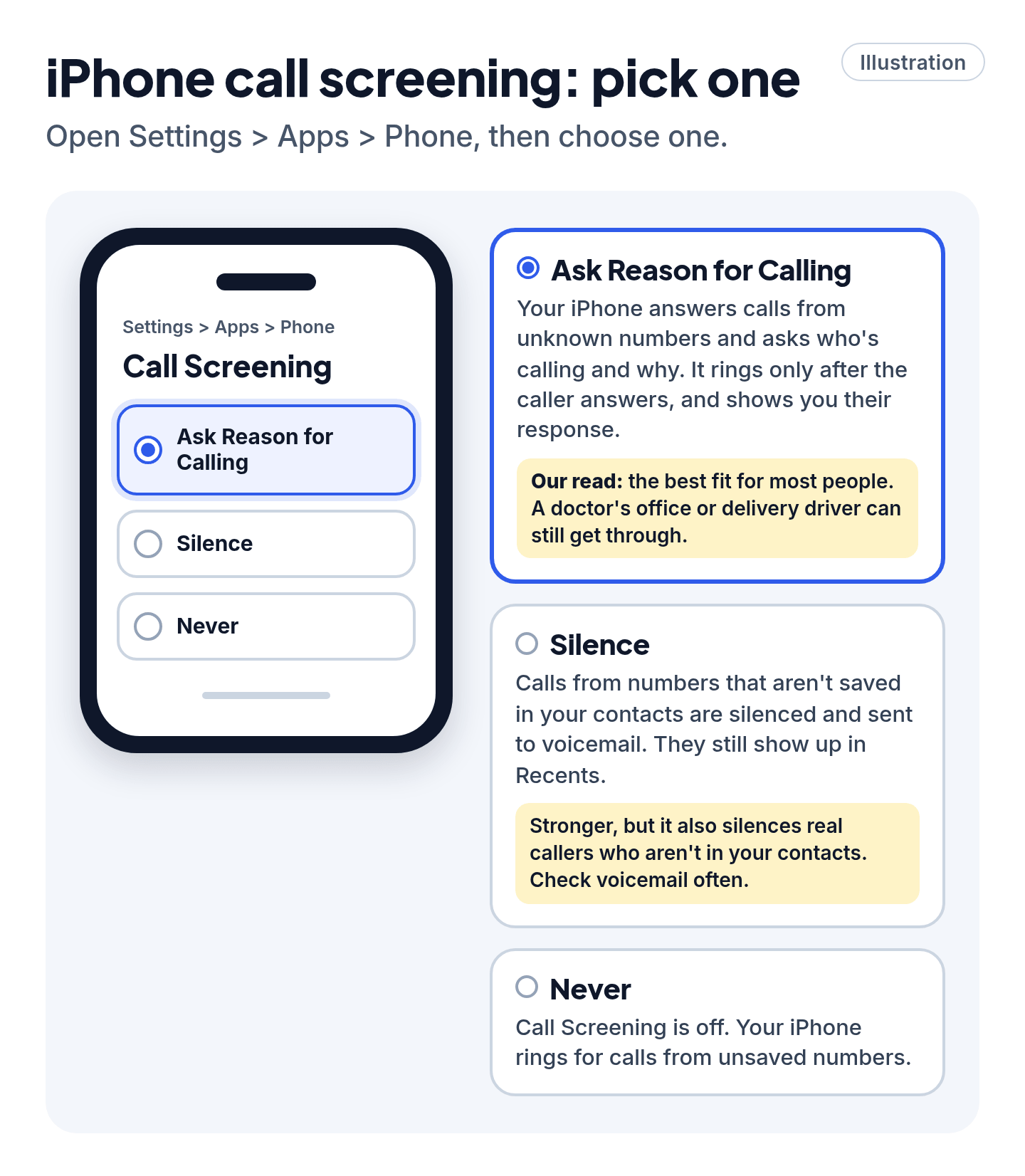
- Open Settings > Apps > Phone.
- Under Call Screening, pick one:
- Ask Reason for Calling: your iPhone answers calls from unknown numbers for you and asks who's calling and why. Your phone rings only after the caller answers, and it shows you their response so you can decide whether to pick up.
- Silence: calls from numbers that aren't saved in your contacts are silenced and sent to voicemail. They still show up in your Recents list.
Our read: Ask Reason for Calling is the best fit for most people, because a doctor's office or delivery driver can still get through. Silence is stronger, but it also silences legitimate callers who aren't in your contacts, so check voicemail often if you choose it.
Filter spam and unknown callers (same screen, Settings > Apps > Phone):
- Turn on Spam. Calls your carrier flags as potential spam or fraud are silenced, sent to voicemail and moved to a separate Spam list.
- Turn on Unknown Callers if you also want calls from unknown numbers moved out of Recents and into an Unknown Callers list.
To see those lists, open the Phone app, tap Calls (or Recents in the classic layout), tap the menu button, then tap Unknown Callers or Spam. If a real caller lands there, tap Mark as Known next to the call so future calls from that number go through.
Turn on caller ID help: Settings > Apps > Phone > Call Blocking & Identification, then turn on Business Call Identification. If you've installed a supported caller ID app, turn it on there too.
Block a number that keeps calling:
- Open the Phone app and go to Recents (or Calls).
- Tap the number (in the classic layout, tap the Info button next to it).
- Tap Block Caller, then confirm.
Blocked callers can still leave a voicemail, but you won't be notified. The caller isn't told they've been blocked. Blocking a number on iPhone also blocks its messages and FaceTime calls. To review or undo blocks, go to Settings > Apps > Phone > Blocked Contacts.
Filter spam texts: open Messages, tap the menu button at the top of the conversation list > Manage Filtering. Spam filtering is on by default; check that it still is. Turn on Screen Unknown Senders to move texts from people who aren't in your contacts into their own Unknown Senders folder. If you rely on texts like verification codes, tap Allow Notifications and turn on the categories you want. To report a spam text, swipe left on it in the conversation list, tap the report button, then tap Delete and Report Spam. Or open the message, tap Report Spam under it, then tap Delete and Report Spam. Reporting doesn't block the sender, so block them too.
3. Google Pixel and the Google Phone app: Call Screen and spam filter
Call Screen (Pixel): Call Screen answers calls for you and asks who's calling and why, so you can see a live transcript before you decide to pick up.
- Open the Phone app > More (three dots) > Settings.
- Tap Spam and Call Screen (on some phones it's Call Screen), then Call Screen.
- On Pixel 7 and later, set how to handle Spam, Possibly faked numbers and First-time callers. You can pick a protection level, such as Maximum, Medium or Basic. On Pixel 6 and earlier, look for Unknown call settings.
Automatic Call Screen is available on Pixel phones in the US, Australia, Canada, Ireland and the UK. You can also screen calls by hand: when an unknown number calls, tap Screen call. Manual Call Screen is available on Pixel in more countries, and on some other Android phones in the US and Canada. Save the numbers of people you want to hear from in Contacts so their calls aren't screened.
Spam filter (Google Phone app on other Android phones):
- Open the Phone app > More options > Settings > Caller ID and spam.
- Make sure See caller ID & spam is on, then turn on Filter spam calls. You won't get missed-call or voicemail notifications for suspected spam calls, but they still appear in your call history.
If your phone has automatic Call Screen, you may not see Filter spam calls, because Call Screen handles it.
Block or report a number: open the Phone app > Home, tap the call, then tap Block or Report spam. On some versions, go to More > Call history, tap the call, then tap Block / report spam. Saw a real call marked as spam by mistake? Tap it and choose Not spam.
Block and report spam texts (Google Messages): touch and hold the conversation, tap Block, check Report spam, then tap OK. Or open the conversation and tap More options > Details > Block & report spam > OK. Spam goes to the Spam & blocked folder.
4. Samsung Galaxy: Caller ID and spam protection
- Open the Phone app > More options (three dots) > Settings.
- Tap Caller ID and spam protection, turn it on, and tap Agree if asked.
- Tap Block spam and scam calls, then choose Block all spam and scam calls or Only block high-risk scam calls.
Samsung calls this feature Smart Call. It may not be available on every carrier or model.
Block unknown and specific numbers: in the Phone app, tap More options > Settings > Block numbers.
- Turn on Block calls from unknown numbers to block calls from numbers that aren't saved in your contacts or identified by Smart Call. That's a strong setting: it also blocks a new doctor's office or delivery driver, so save important numbers first.
- To block one number, type it and tap Add (the plus sign), or pick it from the Recents, Message or Contacts tab.
You can also block straight from your call log: open Recents, tap the number, then tap Menu > Block and confirm. During or right after a spam call, tap Block/Report number at the bottom of the call screen.
5. Turn on your carrier's free spam blocker
Your carrier can flag or block spam before it reaches your phone. AT&T, Verizon and T-Mobile all include free spam protection for eligible customers. Here's how to turn it on.
- AT&T: ActiveArmor. Free with AT&T wireless plans. It blocks fraud calls and can block spam calls or send them to voicemail. Download the AT&T ActiveArmor app (iOS 16.4 or later, Android 10 or later), then go to the Calls tab > Call Routing to set how fraud, spam and private callers are handled. You can also block or send to voicemail specific categories, like telemarketers, political calls or surveys. Turn on Always allow contacts so people in your contacts get through. Keep your voicemail box set up; ActiveArmor sends some calls there.
- Verizon: Call Filter. Free for standard monthly and prepaid plans with a compatible phone. It includes spam detection, a spam filter that sends high-risk spam calls to voicemail, a spam and blocked call log, and a way to report spam numbers. Manage it in the Verizon Protect app (preloaded on most Android phones; otherwise download it from the App Store or Google Play; needs Android 10 or iOS 16.6 or later). If your phone isn't compatible, check Products & plan perks in My Verizon.
- T-Mobile: ScamShield. Free for T-Mobile customers with qualifying service and a capable phone. It labels suspected scam calls as Scam Likely, lets you turn on Scam Block to block them, flags possible spam and lets you send it to voicemail, and lets you block specific numbers. Manage it in the T-Life app. You can also turn on Scam Block by dialing #662# from your T-Mobile phone, or in My T-Mobile or the T-Mobile app. Scam Block might also block a call you want.
On another carrier? Check your carrier's website or app for free call-blocking or call-labeling features.
Cheat code
Start with two free layers. Your phone's built-in filter plus your carrier's free blocker is the easiest setup. If spam still gets through and you want a third-party call-blocking app, check the list at ctia.org (a wireless industry website), read ratings and reviews, and read the app's privacy policy, since some apps access your contacts.
6. Forward spam texts to 7726
Most US carriers let you forward spam texts to 7726 (it spells SPAM on a phone keypad). Check with your carrier if you're not sure yours does. Forwarding helps your carrier spot and block similar messages in the future.
- Copy the spam text, or touch and hold it and choose Forward (the option name varies by phone).
- Send it to 7726.
- Then report and block the sender in your messaging app (Steps 2 to 4).
Don't tap links in spam texts, and don't respond to texts from numbers you don't recognize. On iPhone, Report Spam may also send the report to your carrier, depending on your carrier and country. In Google Messages, a spam report may send your carrier a copy of the number and the latest message.
7. Join the Do Not Call Registry and report the calls you still get
Register your number (free): go to DoNotCall.gov and add your number. You can add up to three numbers at a time online, and cell phones count. You'll get an email with a link; click it within 72 hours to finish. Your number shows up on the registry the next day, but it can take up to 31 days for sales calls to stop. Registration doesn't expire.
Know what it does and doesn't do: the registry stops legitimate telemarketers. It doesn't stop scammers, who ignore it, and it doesn't cover political calls, charities, debt collectors, surveys or purely informational calls. Companies you've recently done business with may still call; ask them directly to stop.
Report the calls you still get:
- Didn't lose money: report the call at DoNotCall.gov.
- Lost money or shared personal info: report it at ReportFraud.ftc.gov.
Include your phone number, the number on your caller ID (even if you think it's faked), any number they told you to call back, and the date and time of the call. Each business day, the FTC releases reported numbers to help phone companies and other partners working on call blocking and call labeling.
Still stuck? Find your situation
- Real calls are going to voicemail now → Save the numbers of people and offices you want to hear from (doctor, pharmacy, school, work) in Contacts. On iPhone, tap Mark as Known in the Unknown Callers list. On a Pixel or Google Phone app, tap the call and choose Not spam. In your carrier app, check the allow list or turn on "always allow contacts."
- Calls show "No Caller ID" or "Private" → In the Google Phone app, tap More > Settings > Blocked numbers and turn on Unknown. This blocks private or unidentified numbers only; you'll still get calls from numbers that just aren't in your contacts. On Samsung, Block calls from unknown numbers covers these too, but also blocks unsaved numbers (Step 4). AT&T ActiveArmor has a separate setting for private callers.
- Every call comes from a different number → Blocking numbers one by one won't keep up. Lean on the screening and spam filters in Steps 2 to 5 instead, which don't depend on you blocking each number.
- Spam calls look like your own area code → That's spoofing. Treat any unknown local number like any other unknown number: let it go to voicemail.
- You use call forwarding on a Pixel → Don't combine automatic Call Screen with call forwarding: screened calls won't be forwarded. Pick one.
- Spam texts keep coming → Forward to 7726, report and block in your messaging app, and turn on unknown-sender filtering (Step 2) or check the Spam & blocked folder (Step 3).
Scam warning
Signing up for Do Not Call is free and takes a minute on DoNotCall.gov. Don't let anyone else "register" you. A caller offering to sign you up, renew your registration or "remove you from call lists" for a fee is a scam; registration doesn't expire. And if a call or text tells you to call back about your bank account, a package or a refund, don't use the number they give you. Look up the real number yourself. If you already paid or shared info, see our guide on what to do after a scam.
Pro Mode
Pro Mode Pro Mode: fine-tune the filters and report like a pro
iPhone: allow-list the right callers. If you choose Silence, anyone not in your contacts goes to voicemail. Before turning it on, add the numbers you rely on. To undo a Mark as Known, tap the number and choose Mark as Unknown at the bottom of the contact card.
iPhone: Call Screening language. When iPhone answers a call for you, Siri speaks in your iPhone's default language.
Pixel: screening details. Call Screen uses your contacts to decide who to screen. It may not screen automatically while you're using headphones, a Bluetooth device or roaming, and it doesn't work with third-party call recording or screen recording apps. Call Screen transcripts are saved on your phone so you can look back at them. It won't catch every spam call or robocall, so keep reporting the ones that slip through.
Google Phone app: fake call detection and privacy. With caller ID and spam protection on, the Phone app can alert you if a caller hides their identity or pretends to be one of your contacts. It needs Android 12 or later, the Phone by Google, Contacts and Google Messages apps, and RCS chats turned on in Google Messages. To make this work, numbers outside your contacts are sent to Google to identify businesses or spot spam.
Samsung: Scam detection. Galaxy phones running Android 16 with One UI 8.5 or later have a built-in Scam detection feature that analyzes incoming calls and alerts you with a tone or vibration if it spots scam patterns. Turn it on in the Phone app's settings.
Google Phone app: blocked voicemails. If you use visual voicemail, blocked callers can't leave you voicemails.
AT&T ActiveArmor: keep voicemail active. If you route calls to voicemail but don't have an active voicemail box, calls from numbers not in your contacts may not go through at all.
Verizon: deleting the app doesn't turn it off. Removing the Verizon Protect app doesn't turn off Call Filter's spam filtering. Manage or turn it off in the app or in My Verizon.
Blocking isn't perfect. Call-blocking tools can miss some spam and can sometimes block a call you wanted. Check your spam list or voicemail now and then.
State lists and the FCC. Many states have their own do-not-call lists; your state's public service commission or consumer protection office can tell you if yours does. You can also file a complaint about unwanted calls and texts with the FCC at consumercomplaints.fcc.gov. The FCC doesn't resolve individual complaints, but it uses them to guide enforcement.
You've got this
You can't stop spammers from dialing, but you can cut down how often they reach you. Turn on your phone's screening, add your carrier's free blocker, report texts to 7726 and register at DoNotCall.gov. Then let unknown numbers go to voicemail and enjoy dinner.
References
All 21 reference links
- Apple Support: Screen and block calls on iPhone
- Apple Support: Block phone numbers, contacts, and emails on your iPhone or iPad
- Apple Support: Block contacts on iPhone
- Apple Support: View and delete the call history on iPhone
- Apple Support: Screen and filter texts on iPhone
- Apple Support: Report spam and block senders on iPhone
- Phone app Help: Screen your calls before you answer them
- Phone app Help: Use caller ID & spam protection
- Phone app Help: Block or unblock a phone number
- Google Messages Help: Report spam in Google Messages (Android)
- Samsung Support: Block spam calls with Smart Call on your Galaxy phone
- AT&T: ActiveArmor security apps
- AT&T Support: Manage calls with AT&T ActiveArmor
- Verizon: Call Filter FAQs
- T-Mobile: ScamShield
- FTC Consumer Advice: How to block unwanted calls
- FTC Consumer Advice: How to recognize and report spam text messages
- FTC Consumer Advice: National Do Not Call Registry FAQs
- National Do Not Call Registry: Register your phone
- FTC: ReportFraud.ftc.gov
- FCC: Stop unwanted robocalls and texts
Never miss a cheat code
Get a new 60-second fix every day: follow on TikTok, YouTube or Instagram.
Want AI to answer your clients?
Our ready-made AI setups come with a step-by-step guide in Easy Mode and Pro Mode. You set them up yourself.
See the AI setupsRelated fixes
Is This a Scam? 4 Warning Signs and What to Do Next, for Parents, Kids and Grandparents
Is this a scam? Learn the FTC's 4 warning signs, spot the tricks aimed at kids, teens and grandparents, and know exactly who to call if you already paid.
Scams · 6 min read
Clicked a Scam Link or Gave Out Your Info? What to Do Right Now
Gave a scammer your password, card number, Social Security number or remote access? Here's what to do in the first 10 minutes, today and this week.
Scams · 7 min read
Told to Pay With Gift Cards, or Already Did? What to Do Right Now
If someone wants you to buy a gift card and read them its numbers, it's a scam. Already paid? Contact the card company and report it.
Scams · 9 min read