
On this page · 4 sections
Most people will go their whole lives without seeing an Apple threat notification. That is the point of the product. The alerts go to a tiny set of people Apple believes were individually targeted by mercenary spyware, the expensive kind usually aimed at journalists, activists, politicians, and diplomats, not at everyday shopping lists and family group chats.
Late October 2026 was one of those rare waves. Several members of Germany's Bundestag and other public figures began receiving manufacturer threat notices on Apple devices starting Oct. 29, and Germany's Federal Office for Information Security (BSI) followed with a letter to Bundestag members on Oct. 30. The same batch reached users in 99 countries. A prior round went out in August. Across every round since 2021, notified users now span more than 150 countries in total.
If you did not get an Apple threat notice, this story is still useful. Scammers copy the look of scary Apple mail. Knowing how to check a real alert, and what Lockdown Mode actually changes, is the practical piece for everyone else.
Real alerts and fake ones
A genuine threat notice can show up on an iPhone, on the Lock Screen and in Settings. It can also arrive by email to the addresses on the Apple Account, and as a banner at the top of account.apple.com after you sign in yourself. Which kinds of notice you get can vary with your device model and software version.
As of 2026, the email comes from Apple Threat Notifications at threat-notifications@email.apple.com. The notice is a high-confidence alert that you were individually targeted by a mercenary spyware attack. Apple does not name the attacker, the country, or the exact trigger. Sharing those details would help the next campaign dodge detection.
A real notice does not ask you to click a link, open an attachment, install an app or configuration profile, or hand over an Apple Account password or verification code by email or phone. To check whether an alert is genuine, type account.apple.com into the browser yourself and sign in. If Apple sent a threat notification, the banner is visible at the top after sign-in. Do not follow a link from the email to "verify."
The vast majority of users are not targets of these attacks. Since 2021 Apple has sent these notices multiple times a year when its internal investigations catch activity that matches mercenary spyware. Public reporting has long tied that class of tool to state-linked buyers and private spyware vendors. Apple does not attribute any specific wave, including this one, to a named product or government.
Phishing that rides this headline follows the same patterns as every other major scare. Treat any of these as fake: a button or link to "secure your Apple Account," "confirm the threat," or "download a security profile"; a request for your password, a six-digit code, or Face ID setup over email or a phone call; a From address that is a lookalike domain, a free webmail account, or anything other than threat-notifications@email.apple.com for the 2026 mail path; a claim that your bank, iCloud photos, or App Store purchases were emptied unless you act in the next ten minutes; or a scare that arrives only as a text or a third-party app banner. Even a correct-looking From line is not enough on its own. Type account.apple.com into the browser yourself and sign in. A real threat notification is clearly visible at the top of that page after sign-in.
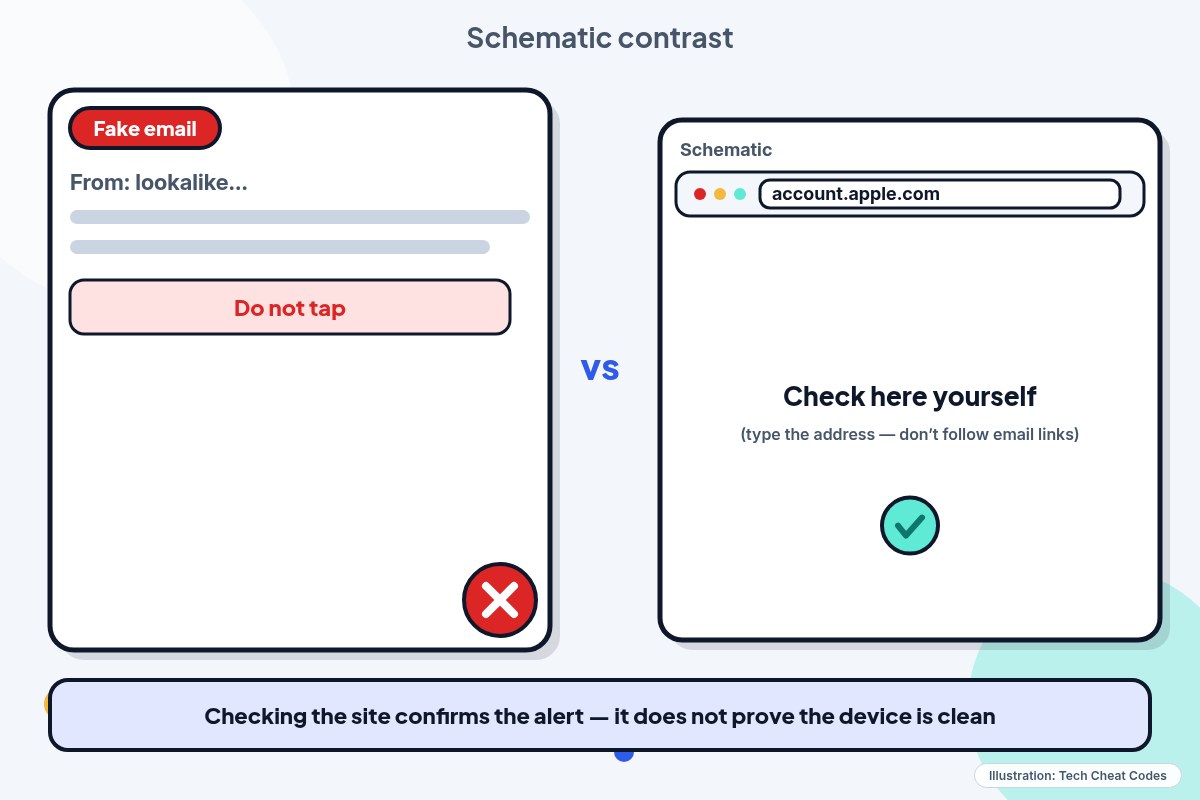
Illustration: Tech Cheat Codes
If you got a real notice
Take it seriously. BSI's November 2026 guidance tells recipients to assume the device may be compromised. That is precaution, not proof that spyware is sitting on the phone. Apple's notice means targeting was detected with high confidence. It does not spell out whether the attack landed.
Mercenary spyware in documented cases often uses zero-click techniques: a crafted message that does not need a tap. Victims usually see nothing. If the device is compromised, attackers can reach messages (including in encrypted apps), calls, contacts, calendar, location, camera, and microphone. Odd crashes or sudden battery drain since the notice are extra reasons to treat the phone as unsafe, but quiet behavior does not clear it.
Unless you are preserving the phone for forensics, update the operating system immediately. Then turn on Lockdown Mode. Apple also points people toward expert help from Access Now's Digital Security Helpline, which runs around the clock through its website. Outside groups do not know why Apple sent the notice. They can still walk a targeted person through hardened setup.
For high-risk cases, BSI guidance includes considering a device swap and a new phone number, then resetting accounts used on the old phone. Change the device passcode to something new. Face ID and Touch ID do not replace that passcode after a restart. Change the Apple Account password and other important passwords used on that device. Turn on two-factor authentication where it was off. Add a new trusted phone number to the Apple Account before you remove the old one. Rebuild authenticator apps on the new device instead of migrating them from the old one. In Signal, turn on Registration Lock with a new PIN. In WhatsApp, turn on two-step verification with a new PIN. Check linked devices on those apps and on the Apple Account, and remove anything you do not recognize.
German recipients can also report the notice to the BSI at service-center@bsi.bund.de so the agency can gauge scale. That step is for people in the BSI's lane. Everyone else still has the Apple and Access Now paths above.
Lockdown Mode
Lockdown Mode is an optional, extreme shield for the few people who might be personally targeted by highly sophisticated attacks. Most people do not need it day to day. When it is on, the phone does not behave like a normal iPhone, because Apple deliberately cuts features that spyware campaigns like to abuse.
On Messages, most attachment types are blocked except certain images, video, and audio. Link previews go away. Incoming FaceTime calls are blocked unless you called that person in the past 30 days. SharePlay and Live Photos in FaceTime are off. Some complex web technology is blocked, so sites can load slowly or break. Shared Albums leave the Photos app on that device, and new Shared Album invites are blocked. The device will not auto-join non-secure Wi-Fi, and it drops a non-secure network when you turn Lockdown Mode on. 2G and 3G cellular support turns off on iPhone and iPad. New configuration profiles cannot be installed, and the device cannot enroll in Mobile Device Management while Lockdown Mode is on.
Phone calls and plain SMS still work. Emergency SOS is unaffected. Incoming calls will not ring on a paired Apple Watch while Lockdown Mode is on for the iPhone.
Lockdown Mode does not scrub an infection that is already present. It shrinks the ways a future attempt can land. Keep it on permanently if you are in the high-risk group, including on a replacement phone, and install every software update as it arrives.
Update the device first so you get the full set of protections. Lockdown Mode needs a separate turn-on on each iPhone, iPad, and Mac. Turning it on for iPhone also turns it on for the paired Apple Watch. Other Apple devices may prompt you to enable it there too.
On iPhone or iPad: Settings > Privacy & Security > Lockdown Mode > Turn On Lockdown Mode. Confirm with Turn On Lockdown Mode, then Turn On & Restart, and enter the passcode.
On Mac: Apple menu > System Settings > Privacy & Security > Lockdown Mode > Turn On, then Turn on Lockdown Mode, then Turn On & Restart.
You can later exclude a trusted website, app, or contact if something you need is broken. Each exclusion weakens the shield. Only carve out what you truly need. Contact exclusions need iOS, iPadOS, or macOS version 27 or later.
Members of parliament, journalists, activists, and other public figures are the people these waves usually touch. Relatives of those people sometimes get pulled in too. Ordinary readers who did not get a threat notice should still know the phishing tells, keep devices updated, use a strong Apple Account password with two-factor authentication, prefer App Store apps, and skip mystery links. Lockdown Mode is there if you have a concrete reason to believe you are an individual target, even without a notification.
The Oct. 29 batch reached users in 99 countries. For everyone else, the useful part is simpler: treat scary Apple mail as unverified until you sign in at account.apple.com yourself and look for the threat banner at the top of the page.
Want the next fix in plain English? Follow Tech Cheat Codes on Facebook. Tap this link, then tap Follow: Follow Tech Cheat Codes on Facebook
References
- About Apple threat notifications and protecting against mercenary spyware — Apple Support
- About Lockdown Mode — Apple Support
- Bedrohungsbenachrichtigungen von Apple zu Mercenary Spyware — BSI (November 2026)
- Germany says lawmakers' iPhones may have been hacked with spyware — TechCrunch (Zack Whittaker, Nov 2, 2026)
- German politicians among those targeted: Apple confirms spyware warning — heise online (Ben Schwan, Nov 3, 2026)
Get the next cheat code
Plain-English tech fixes and scam alerts. Tap Follow on Facebook or TikTok, or pick another below.
Related fixes
New Phone or Computer? How to Move Your Photos, Messages and Files Over for Free
Moving to a new iPhone, Android, Windows PC or Mac? Use the free, built-in transfer tools to bring your photos, messages and files along, step by step.
New Device Setup · 8 min read
Selling or Giving Away an Old Device? How to Wipe It Safely
Before you sell or give away an iPhone, Android phone, Windows PC or Mac: back up, sign out so it isn't locked to you, erase it, then take out your SIM.
New Device Setup · 11 min read
How to Turn On Two-Step Verification for Google, Apple, Microsoft, Facebook, Instagram and Amazon
Add a second sign-in step to Google, Apple, Microsoft, Facebook, Instagram and Amazon: pick an app, text code or passkey, then save your backup codes.
Accounts & Security · 11 min read