On this page · 6 sections
If your iPhone shows a red badge on the Settings icon tonight, that's iOS 27.2. Apple pushed it out Monday afternoon along with matching updates for the iPad, Mac, Apple Watch, Apple TV and Vision Pro, and the part most people won't see is the biggest reason to install it. The iPhone and iPad version alone fixes 163 separate security flaws.
That number comes straight from Apple's own security notes for the release, which list each flaw by its tracking number. None of them is marked as already being used in attacks. Once a list like this is public, though, the details are out there for anyone to study, and phones that sit on the old version are the ones left open.
The new features are mostly about Siri, plus a couple of extras for people who just bought the folding iPhone Duo.
What the security fixes cover
Most of the list is the kind of thing you wouldn't notice until it went wrong. A big chunk deals with apps that could reach data they shouldn't, with 21 entries described as an app that "may be able to access sensitive user data." Another large group covers web pages built to crash Safari or, in five cases, run code on the phone just by being opened. There are fixes for booby-trapped images, fonts, video files and 3D models too.
A few stand out for regular users. One fixes a Mail bug where your real email address could leak while you were using Hide My Email, the feature that's supposed to keep it private. Others deal with someone nearby, within radio range of your phone, being able to crash it or scramble its memory. Another covers a person with their hands on a paired, trusted device reading and writing files they shouldn't.
Apple's notes describe what each flaw could do, not how easy it would be to pull off. Our reading is that none of this is a reason to panic. It is a reason not to tap "Remind Me Later" for a week.
Siri gets a memory
On iPhones that run Siri AI, which means every iPhone 16 model and newer plus the iPhone 15 Pro and 15 Pro Max, Siri can now remember earlier conversations. Apple's own example is asking about the restaurants it suggested last week. It can also pull from more of what's on your phone when it answers, including photos people sent you in Messages, who's invited to a calendar event, your voicemails, and your Safari history and Reading List.
If that much access makes you uneasy, there's a new control for it. A setting called Excluded Apps lets you pick which apps Siri, Search and suggestions are allowed to look at, all in one place. You can also now select and copy just part of a Siri answer instead of the whole thing.
Siri AI now works in French, Japanese, Korean, Portuguese and Spanish as well as English. It still isn't available in the European Union or mainland China.
The rest of the update
Messages can now suggest an action based on what people are texting you. If a friend invites you to dinner, a suggestion can turn that into a calendar event. Shared Albums in Photos let you edit captions and comments, skip photos that are already in the album, and get a reminder before an album expires so nobody loses pictures they meant to save.
Photos and Image Playground also support SynthID, Google's hidden watermark for marking pictures that were made or changed with AI tools. The Apple TV app adds simple profiles, so each person in the house gets recommendations based on what they actually watch. FaceTime can bring in a sign language interpreter or live captioner from an outside service, and the Podcasts app splits new episodes from the ones you're partway through.
Sports fans with an Apple TV subscription get Multiview on the iPhone, which shows up to four live games at once for MLS, Formula 1 in the U.S. and Friday Night Baseball doubleheaders. The Music app has a new icon, too. Small, but you'll spot it.
For iPhone Duo owners
The iPhone Duo got two features of its own. Apple Pencil (the USB-C model) now works on both the outer and inner screens, for notes, sketches and marking up PDFs and photos. Edge Light, a ring of soft light around the edge of the screen that brightens your face on video calls, works in FaceTime and in other calling apps such as Zoom.
This update doesn't mention the inner-screen problem some Duo owners have been reporting. Apple's replacement offer for affected phones still goes through AppleCare, which we covered in our story on Apple's statement.
Who gets it and how to install
iOS 27.2 runs on the iPhone 11 and newer. If you stayed on last year's software, Apple released iOS 26.7.2 the same day with security fixes for the iPhone 11 and later, and iOS 18.7.11 for the iPhone XS, XS Max and XR. iPads get iPadOS 27.2, and Macs get macOS Golden Gate 27.2, with security updates for the two previous macOS versions as well.
Before you start, plug the phone in and connect to Wi-Fi.
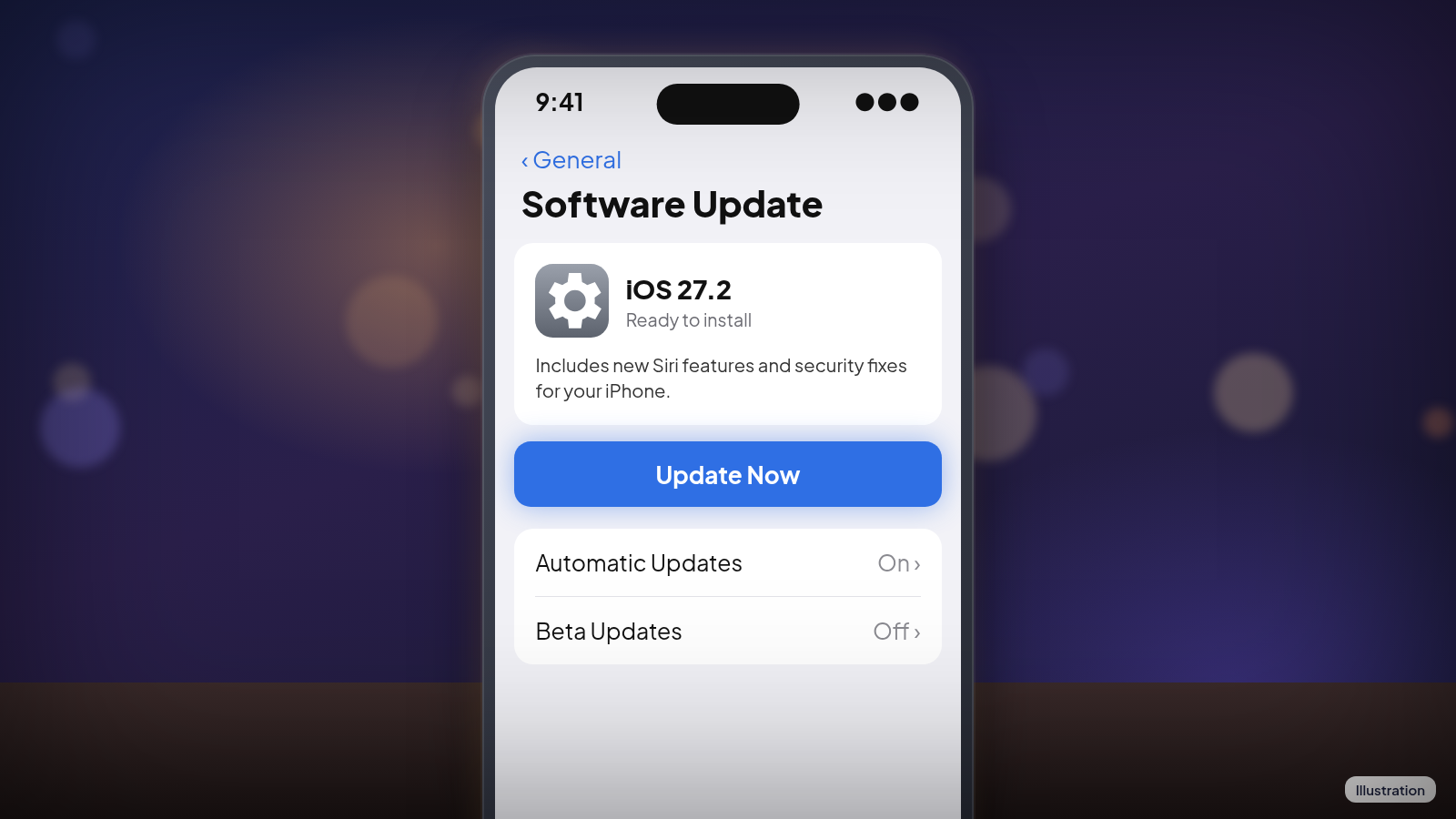
- Open Settings and tap General, then Software Update.
- If you're already on iOS 27, tap Update Now to get iOS 27.2. If you're still on iOS 26, you'll see the iOS 26.7.2 security update at the top and an option to upgrade to iOS 27 below it. Pick the one you want and tap Update Now.
- Enter your passcode and leave the phone on the charger until it restarts.
Updates can't be undone once they're installed, so if you rely on an app for work, it's fine to give it a day and check that the app's maker hasn't flagged problems. After that, go ahead. While you're in that screen, turn on Automatic Updates so the next security fix installs overnight without you having to think about it.
References
- Apple Support: About the security content of iOS 27.2 and iPadOS 27.2
- Apple Support: Apple security releases
- Ars Technica: Apple releases iOS and macOS 27.2 with new Siri AI features, new Music logo
- Engadget: Apple adds more Siri AI tools in its 27.2 system updates
- 9to5Mac: iPhone Duo just got two new features in iOS 27.2
- MacRumors: iOS 27.2 Lets You Watch Four Live Sports Streams on iPhone
- MacRumors: iOS 27.2 Fixes Over 160 Security Vulnerabilities
Never miss a cheat code
Get a new 60-second fix every day: follow on TikTok, YouTube or Instagram.
Related fixes
New Phone or Computer? How to Move Your Photos, Messages and Files Over for Free
Moving to a new iPhone, Android, Windows PC or Mac? Use the free, built-in transfer tools to bring your photos, messages and files along, step by step.
New Device Setup · 8 min read
Selling or Giving Away an Old Device? How to Wipe It Safely
Before you sell or give away an iPhone, Android phone, Windows PC or Mac: back up, sign out so it isn't locked to you, erase it, then take out your SIM.
New Device Setup · 11 min read
Phone Charging Myths: What's Real, What's Fake and the Best Way to Charge
Is overnight charging bad? Is 20-80% best? We rate 12 phone charging myths True, False or Partly true and share free habits that keep your battery healthy.
Phones & Storage · 15 min read