On this page · 3 sections
What happened: On Oct. 21, Walmart laid out how AI assistants such as ChatGPT or Google's Gemini will be allowed to shop on Walmart.com for you. Within the next month, each assistant you use gets its own Agent Profile inside your Walmart account, with its orders kept apart from yours, and you decide whether it has to ask before every purchase or can buy on its own up to a spending limit you pick. Walmart also published a new set of rules those assistants have to follow, dated Oct. 21, 2026.
What this means for you: If you've let an AI assistant into your Walmart account, it's using your own sign-in today, and its orders look exactly like yours. Agent Profiles give you a separate place to see what it bought and to cap what it can spend. Asking first is the default. If you don't use an AI assistant to shop, nothing changes for you.
The details
Right now, an AI assistant that shops at Walmart for you signs in as you. To Walmart, there's no difference between the box of diapers you ordered and the one your assistant ordered at 2 a.m. because it misread a message. That's the problem Agent Profiles are meant to fix.
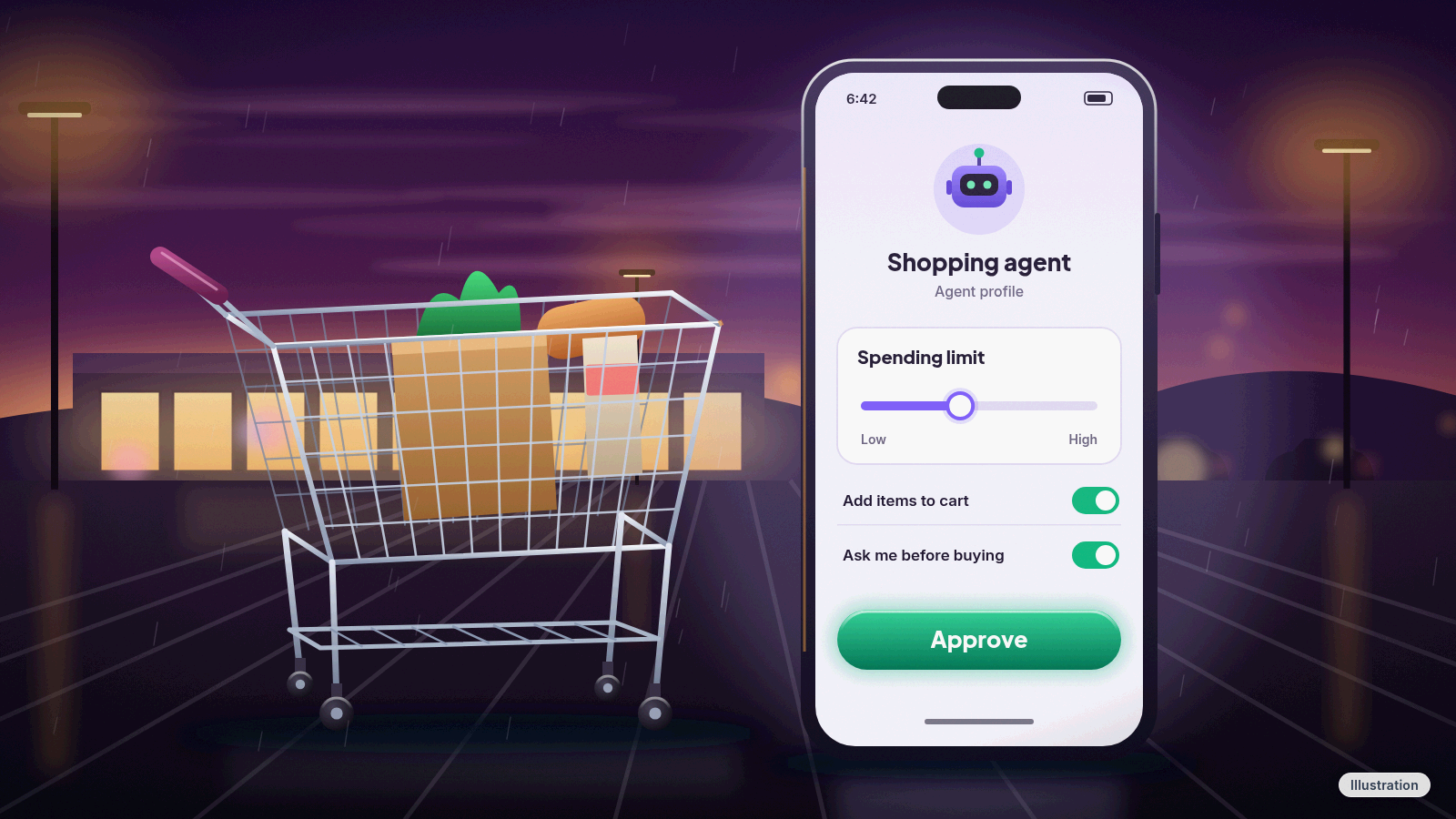
Walmart compares the new setup to adding an authorized user to a credit card: the assistant gets its own profile inside your account, and everything it buys shows up in a separate list instead of mixed in with your own orders. You choose between two settings. Either you approve every purchase, or you let the assistant buy on its own within a limit you set, such as 50, 100 or 200 dollars. You can turn a profile off or delete it whenever you want.
Setting one up starts inside the assistant's app. The first time an assistant shops through Walmart's new system for AI shoppers, called the Agent Gateway, Walmart creates the profile for you. You connect it by signing in to Walmart directly, and only Walmart sees that sign-in, so your password doesn't pass through the assistant. After that, you set the limit and check its purchases from your Walmart account.
There's a catch on timing. The Agent Gateway is "an early beta program" that's available by invitation only to the companies that build these assistants, and Walmart can suspend it at any time. Our read: the assistants that work with it first will depend on which companies Walmart lets in, and that list wasn't public as of Oct. 26.
Two other promises stand out for regular shoppers. The pricing one is short: "We price products, not people." An assistant sees the same prices on Walmart.com that you'd see yourself. And an assistant can be told about your "usuals," like a particular sourdough bread or brand of milk, without Walmart handing over the rest of your shopping history.
The rules AI assistants have to follow
Walmart's new Agentic Access Terms apply to any AI assistant, browser tool or connected app that shops on its sites. They exclude assistive technology for people with disabilities, so a screen reader or similar tool isn't treated as an "agent." The rules that matter most to you:
- It has to say what it is. An assistant must identify itself as an agent, can't disguise that, and has to answer honestly when Walmart's site checks whether it's a person or a bot.
- It needs your clear permission first. Before acting, it must tell you that you're authorizing that specific assistant, that you stay responsible for payment, returns and disputes, and that you can take the permission back at any time.
- Outside the Gateway, you approve every checkout. An assistant that isn't using the Gateway can't check out on its own. Inside the Gateway, it can check out without asking only when the order fits the limits you set, and Walmart can still stop and ask you to confirm.
- It doesn't get your card. Assistants don't receive your card number or security code, and they can't add a new payment method or change the one you picked.
- It has to respect what you asked for. It must follow your brand, price ceiling and category choices, label any substitute or recommendation as one, and it can't misstate prices, fees or delivery times.
Break the rules and Walmart can cut it off. Assistants that ignore them can be slowed down, suspended or blocked from Walmart entirely.
The limits you can set may go beyond a dollar amount. The terms describe controls for how much an assistant can spend per order, which departments it can shop in and how often it can buy.
The fine print worth reading twice
The same terms put responsibility squarely on you and the company behind the assistant. Walmart "is not liable for decisions made by an agent," including what it picks, how many it buys and which substitutes it accepts. The limits you set aren't a promise from Walmart that an assistant will follow them, either.
That sounds harsher than it plays out at the register. Walmart's normal returns process applies to anything an assistant buys, even when the assistant doesn't do what you meant. The terms also leave your legal rights to returns, refunds and disputes untouched. Our read: if an assistant orders the wrong thing, you return it the usual way, but sorting out who pays for a mistake is on you and the assistant's maker, not Walmart.
Privacy is split the same way. Whatever you tell the assistant's app is covered by that company's privacy policy, not Walmart's.
Walmart isn't the only company deciding what AI assistants may do inside your accounts. Several big US banks have gone the other way, blocking or limiting AI agents that sign in with customers' passwords, which we covered in our story on banks blocking AI agents.
What to do now
- If you've given an AI assistant your Walmart password, decide whether you still want it to have that. Until Agent Profiles arrive, it's shopping as you. If you've stopped using it, change your Walmart password.
- When Agent Profiles show up, start with approval for every purchase. Our read: that's the safer setting for most people, and especially for an older parent or anyone who isn't checking orders often. You can switch to a spending limit later.
- Pick a low limit if you use one, at least for the first few weeks, because a low cap keeps any mistake an assistant makes small enough to shrug off and return without much hassle.
- Check the assistant's orders. They'll be listed apart from yours, so a quick look after it shops is easy.
- Return wrong items the normal way. Walmart's regular returns process covers what an assistant buys.
- Delete the profile when you're done. If you stop using an assistant, remove its profile instead of leaving it connected.
Agent Profiles are due within a month of Walmart's Oct. 21 post, and the Gateway behind them stays an invitation-only beta for now.
References
Never miss a cheat code
Get a new 60-second fix every day: follow on TikTok, YouTube or Instagram.
Related fixes
How to Turn On Two-Step Verification for Google, Apple, Microsoft, Facebook, Instagram and Amazon
Add a second sign-in step to Google, Apple, Microsoft, Facebook, Instagram and Amazon: pick an app, text code or passkey, then save your backup codes.
Accounts & Security · 11 min read
Is This a Scam? 4 Warning Signs and What to Do Next, for Parents, Kids and Grandparents
Is this a scam? Learn the FTC's 4 warning signs, spot the tricks aimed at kids, teens and grandparents, and know exactly who to call if you already paid.
Scams · 6 min read
Phone Battery Draining Fast? Free Fixes for iPhone and Android
Phone battery dying by lunch? Find what's draining it and fix it free on iPhone, Pixel or Samsung Galaxy before you pay for a new battery or phone.
Phones & Storage · 5 min read